

phpMyAdmin Text Display Error
Anybody Out There Having Return Character Problems?
Posted by Charlie Recksieck
on 2025-05-15
If you ever work directly in phpMyAdmin databases enter or alter data, then this is a very salient issue for you about formatting LONGTEXT.
If this doesn't apply to you, I'd advise you to skip this week's post and come back another time.
For the rest of you who may have Googled your way here, here's the issue ....
The Issue
Sometimes when you edit in phpMyAdmin it seems like the return characters disappear. When you're expecting to see:

It comes out without the return or enter characters all of a sudden:

Why?
phpMyAdmin doesn't intentionally remove newline/return characters - but a few common behaviors make it look like they're being stripped.
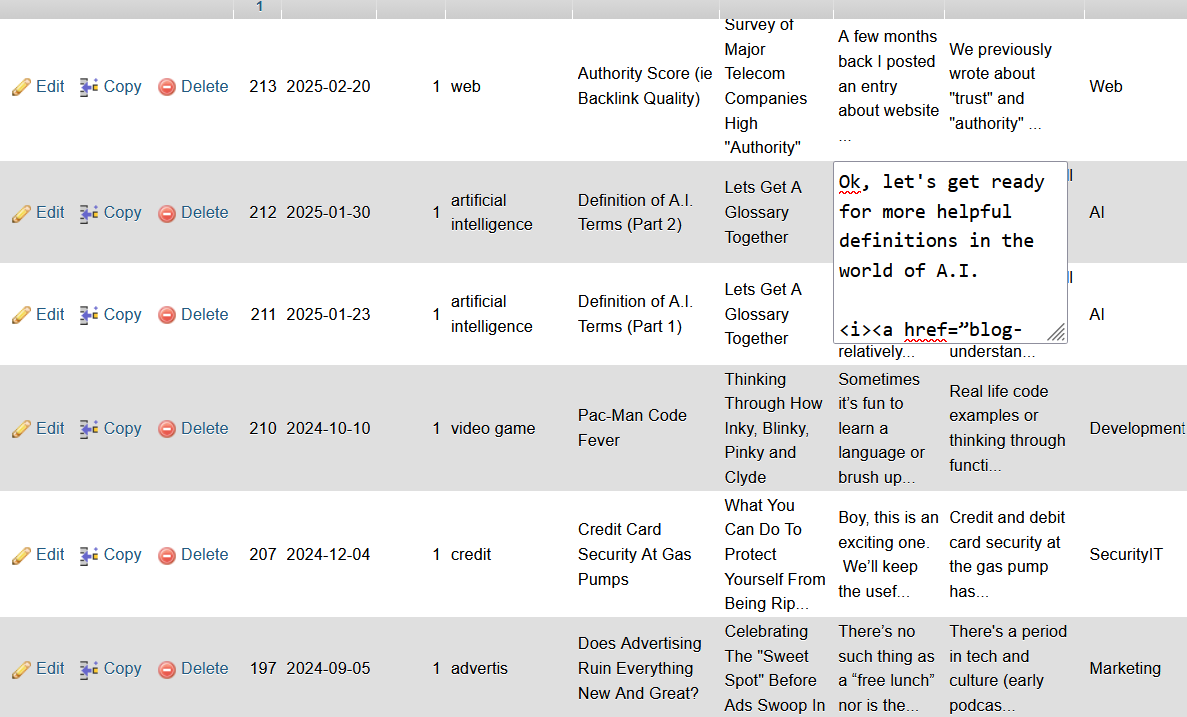
The reason is that if you edit a text field manually in Database view by double-clicking a text field and editing or pasting there, it damaged the result.
When phpMyAdmin displays text from a database, it renders it as plain HTML. In HTML, line breaks aren't shown unless they're converted to
tags. So the data is still there - just not visually displayed.
By the way, if you paste Windows text into phpMyAdmin on Linux, sometimes the \r is stripped and the newline becomes inconsistent. Also, certain character encodings can cause unexpected control-character handling, especially if pasting content from Word or formatted text sources. Some browsers strip carriage returns when pasting into fields.
What To Do Instead?
To stop making this error, make sure to Edit the whole record instead of modifying on record in database view like this
How To Fix When Displaying
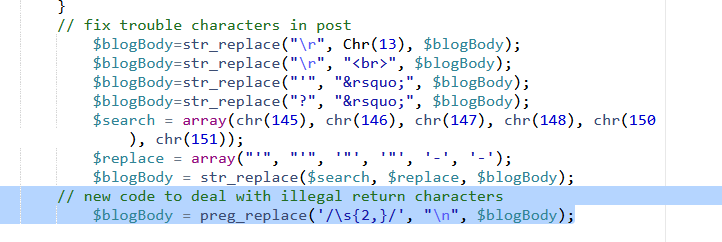
Here's the PHP command to fix this if you've got this buggy insert to your text fields. (Since we're talking about mySql then I feel comfortable with a PHP solution, since those are the M and the P in LAMP platforms.)
$blogBody = preg_replace(’/\s{2,}/’, "\n", $blogBody);
Voila!
That's all. Simple weird issue with a simple fix.
