
How to Build a Content System That Actually Grows Your Business
Social Media For Small Business
Posted by Charlie Recksieck
on 2026-08-20
* * *
Local and online small business owners often do the hard part, deliver real value, then watch their posts disappear with little audience engagement. The tension isn't effort; it's that engaging digital content without brand consistency can feel like shouting into a crowded room, leaving digital brand presence coming off a bit random.
When content looks, sounds, and feels reliably aligned, people recognize it faster, trust it sooner, and return more often. With the right approach, content becomes a steady signal that turns casual scrollers into a connected audience.
Quick Summary: Build Content That Grows Business
* Choose content formats that match your goals and your audience's preferred ways to learn.
* Analyze audience needs so each piece answers real questions and supports clear business outcomes.
* Create a publishing schedule to deliver consistent value and build trust over time.
* Improve visual and headline impact to earn clicks and keep readers engaged.
* Repurpose high-performing content and measure results to refine what you publish next.
* Analyze audience needs so each piece answers real questions and supports clear business outcomes.
* Create a publishing schedule to deliver consistent value and build trust over time.
* Improve visual and headline impact to earn clicks and keep readers engaged.
* Repurpose high-performing content and measure results to refine what you publish next.
Turn Your Best Ideas Into Downloadable PDFs People Keep
When you've nailed the core moves that make content engaging and consistent, the next step is packaging your best ideas so people can actually keep them. A polished PDF can outperform a standard post when you're sharing something readers want to save and revisit, like a guide, report, or portfolio.
PDFs feel finished and professional, which can boost credibility, and they're easy to distribute: audiences can download them, forward them, and you can repurpose the same asset across your site, email, and social channels without the formatting shifting from platform to platform. Saving a document as a PDF also helps preserve your visual layout, making your content look intentional and on-brand wherever it lands.
If you want distribution to feel effortless, there are online PDF tools that let you convert files, compress large documents, edit pages, rotate views, and reorder sections, so the final version reads cleanly and looks sharp.
Use This Practical Checklist to Upgrade Every Piece You Publish
When I want my content to feel more "grown up" without getting complicated, I run a simple checklist before I hit publish. Use this to choose the right format, speak to the right people, and improve results piece by piece.
* Choose the format that matches the job: Start by deciding what your audience needs right now: a quick answer, a step-by-step, proof, or a downloadable asset. Use short posts for one idea, a longer article for a full framework, and a polished PDF when you want something people can save, share internally, or use as a checklist. If you already packaged a guide into a clean PDF, treat it as your "flagship" and build smaller content that points back to it.
* Segment your audience into 2-3 groups you can actually write for: Write down your most common reader types and what they're trying to achieve (and what's stopping them). A concrete example like travel brand audience segments shows how three groups can want the same outcome in different ways, your business can do the same with "DIY learners," "busy buyers," and "comparison shoppers." Then pick one primary segment for each piece, so the message stays sharp.
* Lock a publishing schedule you can keep for 8 weeks: Consistency beats intensity. Choose a realistic cadence (for example: one "anchor" post weekly plus two short supporting posts) and decide your non-negotiable publishing days. If you're using PDFs, schedule one new or updated downloadable per month and treat it like a mini launch you can repeat.
* Use a repeatable visual upgrade pass: Give yourself 10 minutes to improve readability and polish: add one simple graphic or screenshot, break text every 2-3 lines and use bold for scanning. Keep colors and fonts consistent with your PDF so everything feels like one brand family. If you can't add a visual, add structure, subheads, bullets, and a "Key takeaway" line do a lot of heavy lifting.
* Optimize headlines with a 3-option rule: Draft three headlines before choosing one: a benefit headline, a curiosity headline, and a "how-to" headline. Keep them specific by naming the audience or outcome ("for new managers," "in 30 minutes," "without ads"). If you're promoting a PDF, make the headline match the promise on the download cover so the click feels like a clean handoff.
* Repurpose from the PDF outward (not the other way around): Pull 5-10 micro-topics from your PDF and turn each into a short post, a carousel-style breakdown, or an email. Each repurposed piece should answer one question and include one clear next step such as "grab the checklist" or "try step 2 today." This keeps your content coherent and reduces idea fatigue.
* Do basic analytics once a week and let it steer your next draft: Track just a few signals: views/reach, saves/bookmarks, clicks to your PDF, and replies/comments. Start by auditing your current performance so you know what's already working, then repeat what performs and trim what doesn't. Over time, you'll build a simple feedback loop where your calendar, your revisions, and your best formats reinforce each other.
* Segment your audience into 2-3 groups you can actually write for: Write down your most common reader types and what they're trying to achieve (and what's stopping them). A concrete example like travel brand audience segments shows how three groups can want the same outcome in different ways, your business can do the same with "DIY learners," "busy buyers," and "comparison shoppers." Then pick one primary segment for each piece, so the message stays sharp.
* Lock a publishing schedule you can keep for 8 weeks: Consistency beats intensity. Choose a realistic cadence (for example: one "anchor" post weekly plus two short supporting posts) and decide your non-negotiable publishing days. If you're using PDFs, schedule one new or updated downloadable per month and treat it like a mini launch you can repeat.
* Use a repeatable visual upgrade pass: Give yourself 10 minutes to improve readability and polish: add one simple graphic or screenshot, break text every 2-3 lines and use bold for scanning. Keep colors and fonts consistent with your PDF so everything feels like one brand family. If you can't add a visual, add structure, subheads, bullets, and a "Key takeaway" line do a lot of heavy lifting.
* Optimize headlines with a 3-option rule: Draft three headlines before choosing one: a benefit headline, a curiosity headline, and a "how-to" headline. Keep them specific by naming the audience or outcome ("for new managers," "in 30 minutes," "without ads"). If you're promoting a PDF, make the headline match the promise on the download cover so the click feels like a clean handoff.
* Repurpose from the PDF outward (not the other way around): Pull 5-10 micro-topics from your PDF and turn each into a short post, a carousel-style breakdown, or an email. Each repurposed piece should answer one question and include one clear next step such as "grab the checklist" or "try step 2 today." This keeps your content coherent and reduces idea fatigue.
* Do basic analytics once a week and let it steer your next draft: Track just a few signals: views/reach, saves/bookmarks, clicks to your PDF, and replies/comments. Start by auditing your current performance so you know what's already working, then repeat what performs and trim what doesn't. Over time, you'll build a simple feedback loop where your calendar, your revisions, and your best formats reinforce each other.
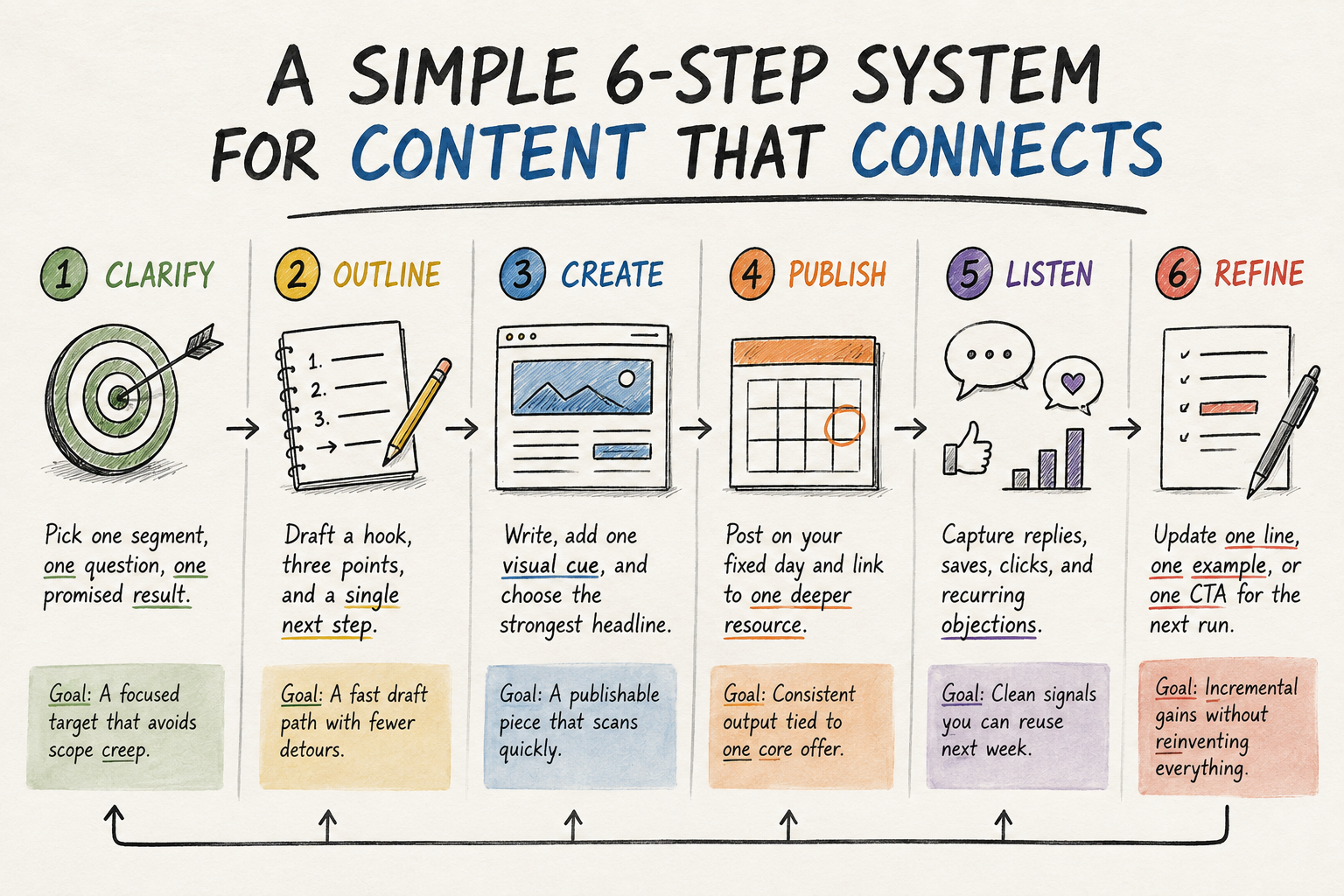
A Simple Loop You Can Run Every Week
This workflow turns "post when I have time" into a steady system you can repeat even on busy weeks. It connects your calendar to small feedback-driven improvements, so each piece of content teaches you what to create next.
Remember that reflection is not extra work; it is the engine.
1 - CLARIFY
Pick one segment, one question, one promised result.
Goal: A focused target that avoids scope creep.
2 - OUTLINE
Draft a hook, three points, and a single next step.
Goal: A fast draft path with fewer detours.
3 - CREATE
Write, add one visual cue, and choose the strongest headline.
Goal: A publishable piece that scans quickly.
4 - PUBLISH
Post on your fixed day and link to one deeper resource.
Goal: Consistent output tied to one core offer.
5 - LISTEN
Capture replies, saves, clicks, and recurring objections.
Goal: Clean signals you can reuse next week.
6 - REFINE
Update one line, one example, or one CTA for the next run.
Goal: Incremental gains without reinventing everything
When you run the loop, each stage feeds the next: clarity makes outlining easier, publishing creates real-world signals, and refining keeps your library improving. After a few rounds, your content starts to feel like a compounding asset instead of a recurring chore.
Publish One Consistent Post to Build Business Growth Momentum
It's easy to stall out when content feels like a never-ending to-do list and every post has to be "worth it." The weekly loop, plan, publish, listen, refine, turns that pressure into digital content empowerment, guided by clear, actionable content strategies instead of guesswork. When the work is steady, the brand consistency benefits start compounding: people recognize you faster, trust you sooner, and come back more often, which supports small business growth.
Consistency builds trust faster than cleverness. Choose one next post, draft it in one sitting, and ship it this week. That single shipment is how stability turns into momentum, and momentum turns into growth.
